Build a Bot that finds clients due for a rebook, drafts friendly reminders, follows up after consults and drafts review requests. It never sees treatment details, and staff approve every message.
This walkthrough has not been run end to end.
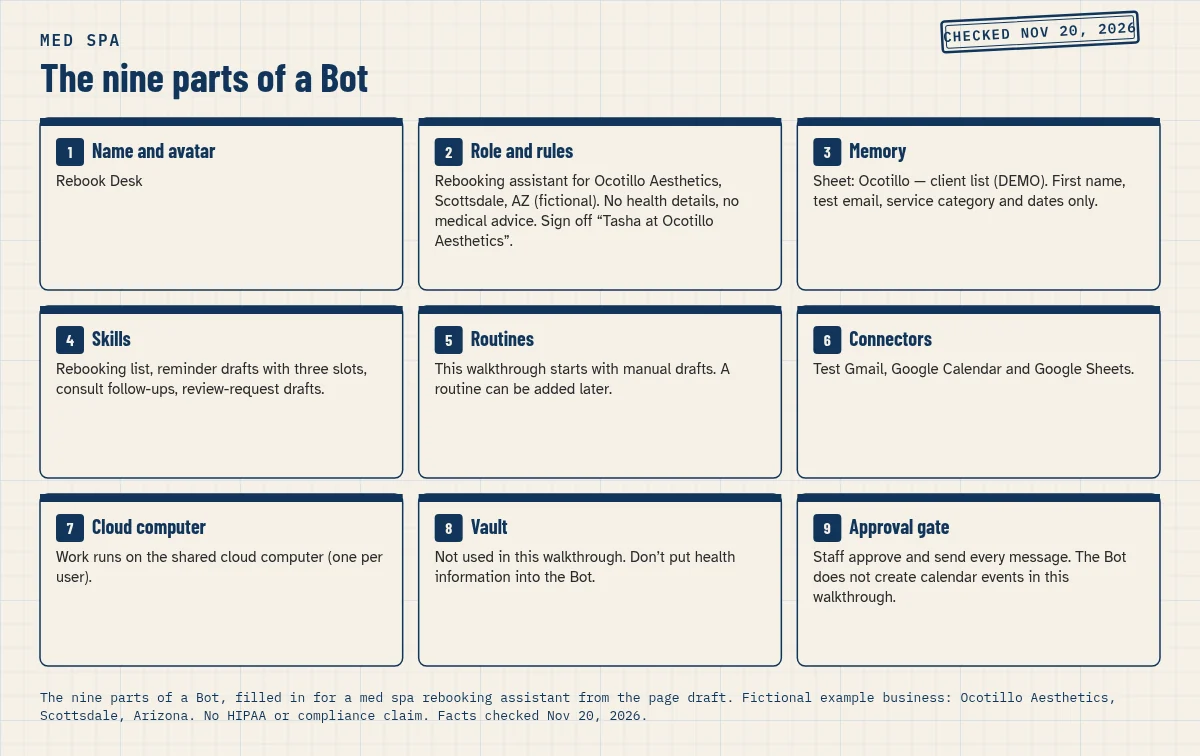
Health information: read this first
We found no HIPAA statement in the Grok Bot docs (checked Nov 20, 2026). Don’t put patient health information into a Bot unless your compliance adviser confirms it’s allowed. Enterprise buyers can ask sales about compliance requirements.
That’s why this build uses a demo sheet with only a first name, a service category (such as “facial” or “consult”) and a last-visit date. No treatment details, photos, medical notes or health history. Also note that Grok Bot needs cloud data storage, so Legacy Privacy Mode isn’t supported. (Grok Bot FAQ) See privacy and security.
At a glance
What you’ll have at the end: a Bot called “Rebook Desk” on a test account that can:
- List clients whose last visit was more than 8 weeks ago.
- Draft rebooking reminders with three proposed slots.
- Draft consult follow-ups.
- Draft review requests.
Plan needed: Grok Bot is included on Premium ($30/mo), Super and Ultra on The X Subscription (checked Nov 20, 2026). See Grok Bot pricing.
Prerequisites: 1.6 First Bot, 2.6 Approvals, 2.8 Routines, and a separate test Google account.
Meet the business
Example data (fictional): Ocotillo Aesthetics, 4500 Example Road, Scottsdale, Arizona, (480) 555-0109. Front-desk lead Tasha Brooks books facials, peels and consults for two providers. Clients often forget to rebook, and consult follow-ups slip when the desk is busy. Time zone: Arizona time (America/Phoenix).
Before you start
- Use a test Google account and fictional first names only.
- The Gmail app can search and read mail, draft and send, and apply labels. The Google Calendar app can read calendars, create and update events and check free time. (Computer and apps) In this build, the Bot only drafts and proposes.
Prepare the fictional sources
Step 1: Create the demo sheet and calendar
What to do in the app: in the test account:
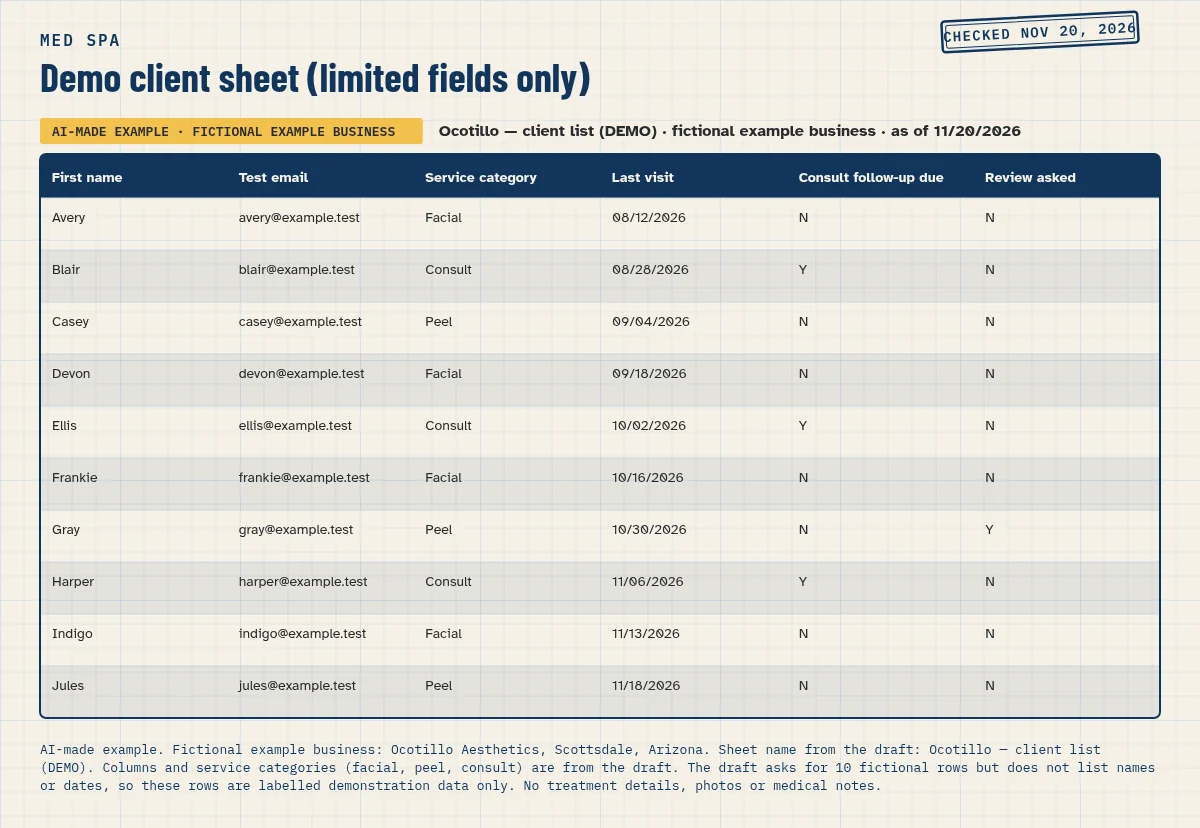
- Google Sheet Ocotillo — client list (DEMO) with columns: First name, Email (test addresses only), Service category, Last visit (MM/DD/YYYY), Consult follow-up due (Y/N), Review asked (Y/N). Add 10 fictional rows.
- Calendar Ocotillo — appointments (DEMO) with a few booked slots.
No prompt.
Expected result: a sheet with no health details and a test calendar.
Set the boundaries before using apps
Step 2: Add lasting rules
Paste this into: Grok Bot chat, message box
Remember these as lasting rules for Rebook Desk:
1. Drafts only. Never send an email or create or change a calendar event without asking me first.
2. No medical advice. Never mention treatments, results, side effects or skin conditions. Clinical questions go to "your provider".
3. Use only first name, service category and dates from the demo sheet. If a message contains health details, don't repeat them; flag it for Tasha.
4. No prices or discounts unless I write them into the prompt.
Expected result: the Bot confirms the rules.
Create the Bot and connect the test apps
Step 3: Create “Rebook Desk” and connect apps
What to do in the app: create a Bot named Rebook Desk. Connect Gmail, Google Calendar and Google Sheets with the test account.
No prompt.
Expected result: the Bot can see the sheet, calendar and test inbox.
Give the Bot its role
Step 4: Describe the job
Paste this into: Grok Bot chat, message box
You are Rebook Desk for Ocotillo Aesthetics in Scottsdale, Arizona (fictional). Hours: Tuesday–Saturday, 9:00 AM–6:00 PM Arizona time. Tone: warm, calm, never pushy. Sign off "Tasha at Ocotillo Aesthetics". Use US dates (MM/DD/YYYY).
Expected result: the Bot repeats the job.
Run the drafts manually
Step 5: Build the rebooking list
Paste this into: Grok Bot chat, message box
From "Ocotillo — client list (DEMO)", list everyone whose Last visit is more than 8 weeks before today. Show first name, service category and last visit. Don't change the sheet.
Expected result: a short rebooking list.
Step 6: Draft rebooking reminders
Paste this into: Grok Bot chat, message box
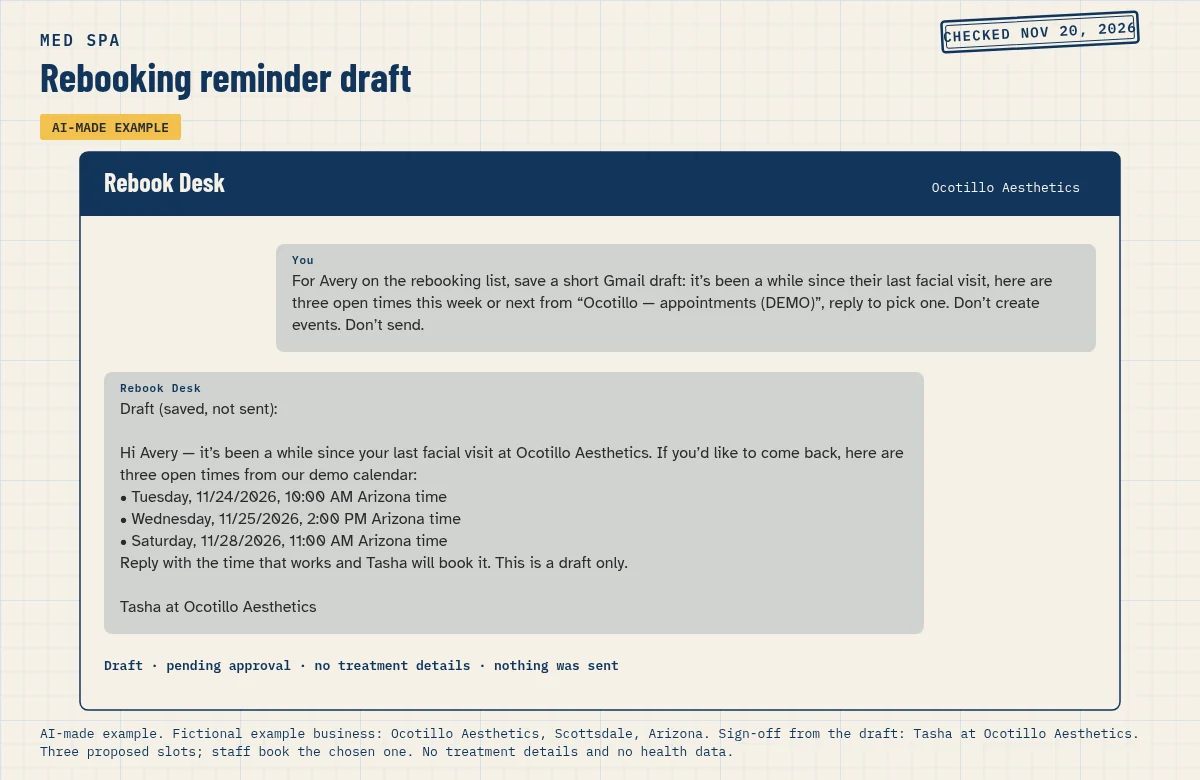
For each client on the rebooking list, save a short Gmail draft: it's been a while since their last [service category] visit, here are three open times this week or next from "Ocotillo — appointments (DEMO)", reply to pick one. Don't create events. Don't send.
Expected result: reminder drafts. Staff send them and book the chosen slot.
Step 7: Draft consult follow-ups
Paste this into: Grok Bot chat, message box
For each row with Consult follow-up due = Y, save a Gmail draft thanking them for coming in, inviting questions for their provider, and offering two times to book. No treatment names or advice. Don't send.
Expected result: follow-up drafts.
Step 8: Draft review requests
Paste this into: Grok Bot chat, message box
For clients who visited in the last 7 days and have Review asked = N, save a short Gmail draft thanking them and asking, with no pressure, if they'd share a review. Leave [REVIEW LINK] for Tasha to fill in. Don't send. After I approve, set Review asked to Y.
Expected result: review drafts. For a deeper review workflow, see the beauty spa Review Booster.
Test it
Run Steps 5–8 weekly for a few weeks. Then you can ask for a Monday routine that builds the list and saves drafts. Every routine run spends usage from your weekly pool. See routines.
Staff review and next steps
- Tasha reads, sends and books.
- Providers answer every clinical question.
If this goes wrong
- A draft mentions a treatment detail: repeat rule 2 and remove that column from the sheet.
- It proposes a time outside hours: restate the hours in Step 4.
FAQ
Is Grok Bot HIPAA compliant?
We found no HIPAA statement in the Grok Bot docs (checked Nov 20, 2026). Don’t put patient health information into a Bot unless your compliance adviser confirms it’s allowed. Enterprise buyers can ask sales about compliance requirements.
Can it answer the spa’s phone?
We found no documentation of answering incoming calls. See AI receptionist: what it can and can’t do.
Can it book appointments?
In this build it proposes slots, and staff confirm.
Can it answer treatment questions?
No. This build routes every clinical question to the provider.