Build a Bot that reads the reports you export from your seller account and turns them into a restock list, ad-spend suggestions and listing drafts. It never logs in to Seller Central and never changes anything there.
This walkthrough has not been run end to end.
Why exports, not logins
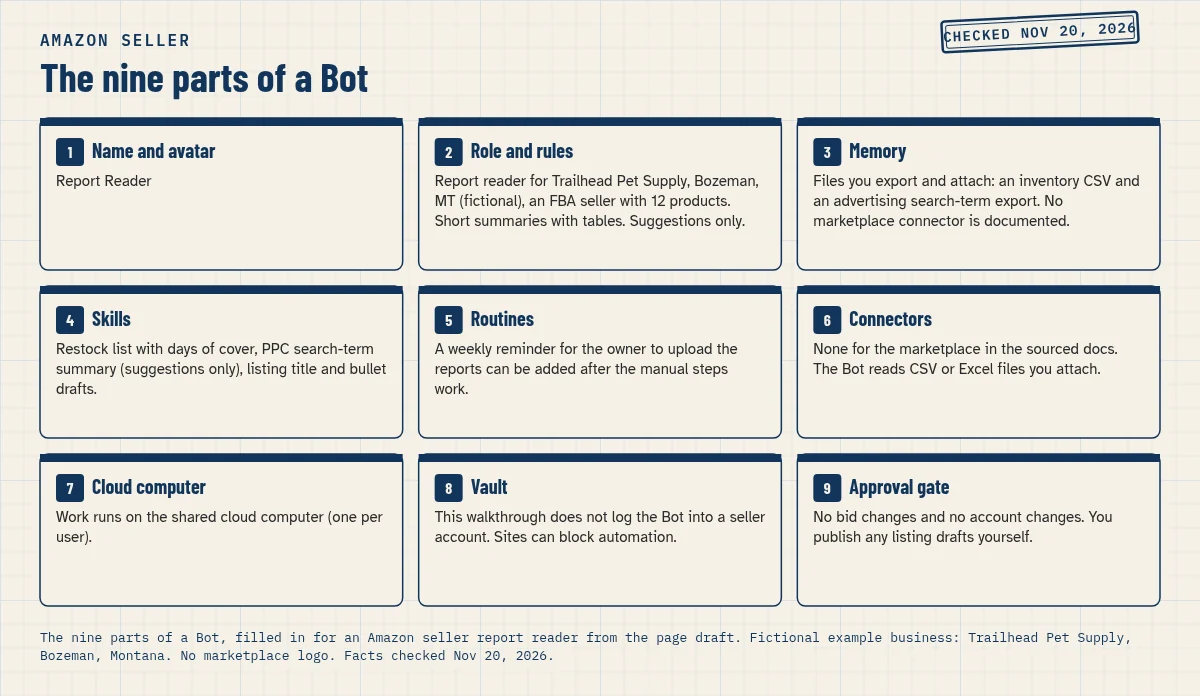
We found no Amazon connector in the Grok Bot docs (checked Nov 20, 2026). Bots can use many websites without a connector, but sites may block automation or show a CAPTCHA, and the Bot hands those steps to you. (Grok Bot FAQ) So this build works from CSV or Excel files you download and attach. Grok Bot reads CSV, Excel, PDF and other common files. (Files and results)
At a glance
What you’ll have at the end: a Bot called “Report Reader” that can:
- Build a restock list with days of cover from an inventory export.
- Summarize an advertising search-term export and suggest wasted-spend candidates. Suggestions only, no bid changes.
- Draft a listing title and bullets from your product brief.
- Remind you every Monday to export and attach the reports.
Plan needed: Grok Bot is included on Premium ($30/mo), Super and Ultra on The X Subscription (checked Nov 20, 2026). See Grok Bot pricing.
Prerequisites: 1.6 First Bot, 2.6 Approvals, 2.8 Routines.
Meet the business
Example data (fictional): Trailhead Pet Supply, 19 Example Way, Bozeman, Montana, (406) 555-0120. Owner Kim Larsen sells 12 dog-gear products through Fulfillment by Amazon. She checks stock and ad spend on Sunday nights, in a rush. She wants a 10-minute Monday review instead. Time zone: Mountain Time (America/Denver).
Before you start
- Use fictional files while you learn. Make a small CSV by hand, or copy a real export and replace names and numbers.
- Attachment limits, in the desktop app: up to 20 attachments per message. CSV and Excel exports count as documents, up to 250 MB each. Product photos can be up to 25 MB each and 200 MB in total per message. If a file is over its limit, the app says it’s too large and leaves it out, so send it in another message. (Files and results)
- File types: common supported inputs include CSV, Excel, PDF and plain-text files, and images. That’s not a complete list. If a file can’t be read, export it as CSV or PDF. (Files and results)
- On a phone, you can attach a photo or file from the message box, or share one from another app. (Mobile)
- Report names change. Use whatever inventory and advertising exports your seller account offers.
Prepare the fictional sources
Step 1: Make two demo CSVs and a product brief
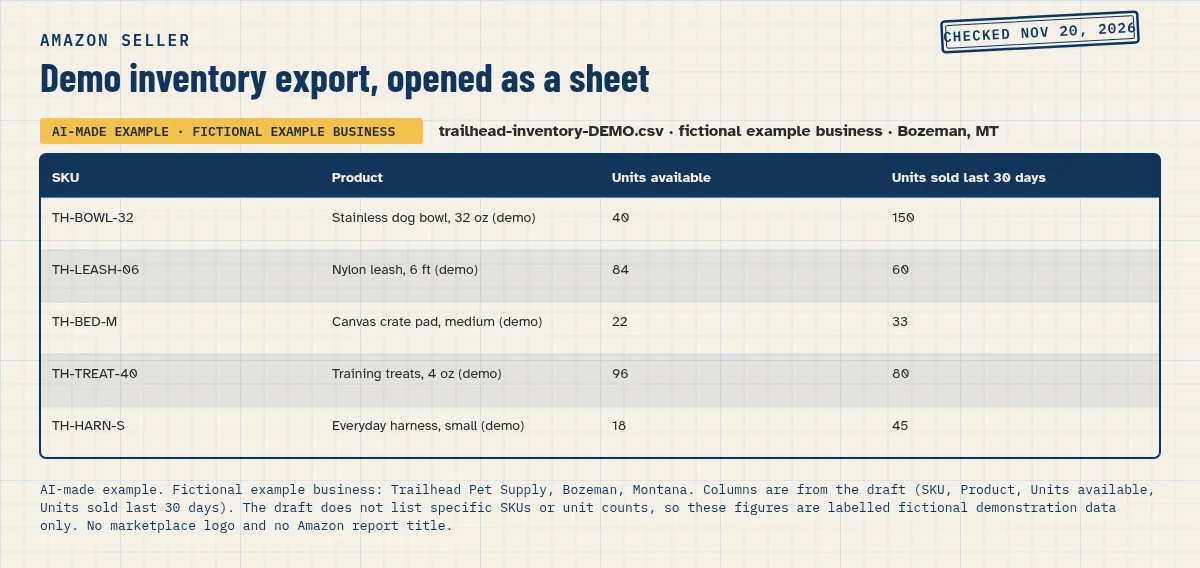
What to do in the app: on your computer, create:
- trailhead-inventory-DEMO.csv with columns: SKU, Product, Units available, Units sold last 30 days.
- trailhead-ads-DEMO.csv with columns: Search term, Clicks, Spend (USD), Orders.
- A short product brief for one new item: “Trailhead Reflective Dog Leash, 6 ft, waterproof webbing, 3 colors” (fictional).
No prompt.
Expected result: files you can attach to the chat.
Set the boundaries before using apps
Step 2: Add lasting rules
Paste this into: Grok Bot chat, message box
Remember these as lasting rules for Report Reader:
1. Work only from files I attach. Never log in to Seller Central or any marketplace account.
2. Never change bids, budgets, prices or listings. Give suggestions for me to act on.
3. Show the formula behind every number you calculate. If a column is missing, say so.
4. Listing drafts: no claims I didn't give you (no "best," no health or safety claims).
Expected result: the Bot confirms the rules.
Create the Bot and connect the test apps
Step 3: Create “Report Reader”
What to do in the app: create a Bot named Report Reader. No apps are needed; you attach files. Optionally connect Google Sheets if you want results saved to a sheet.
No prompt.
Expected result: an empty Bot ready for files.
Give the Bot its role
Step 4: Describe the job
Paste this into: Grok Bot chat, message box
You are Report Reader for Trailhead Pet Supply in Bozeman, Montana (fictional), an FBA seller with 12 products. Each Monday I'll attach an inventory export and an advertising search-term export. Give me short, plain-English summaries with tables. Money in USD, dates MM/DD/YYYY.
Expected result: the Bot repeats the job.
Run the drafts manually
Step 5: Restock list
Paste this into: Grok Bot chat, message box (attach trailhead-inventory-DEMO.csv)
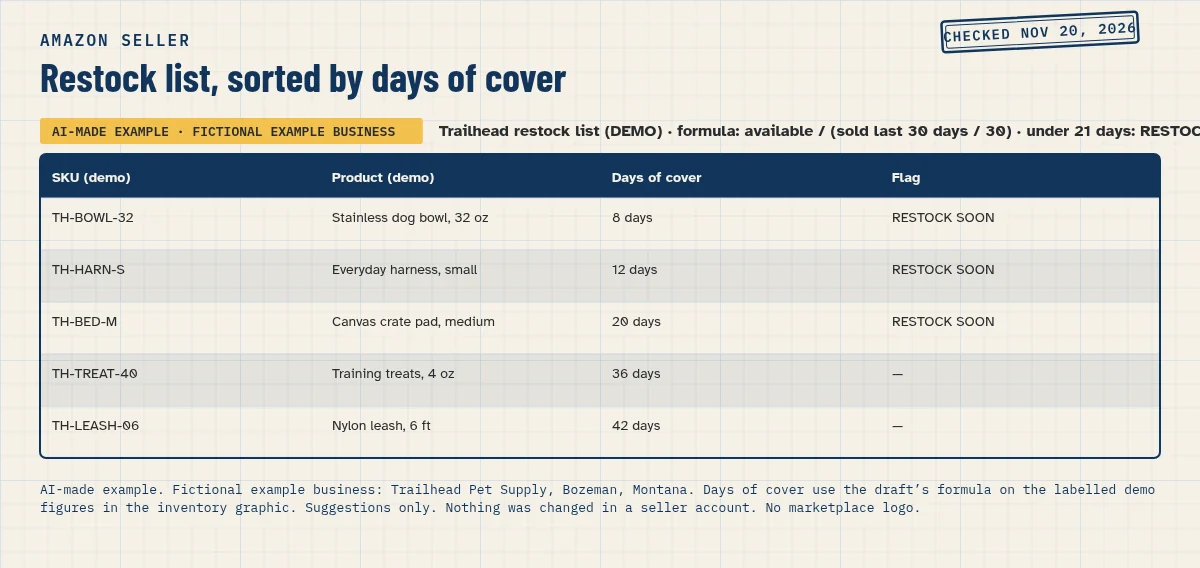
Using the attached inventory file, calculate days of cover for each SKU: Units available ÷ (Units sold last 30 days ÷ 30). Sort from lowest to highest. Flag anything under 21 days as RESTOCK SOON. Show the formula once at the top.
Expected result: a sorted restock table.
Step 6: Ad search-term summary
Paste this into: Grok Bot chat, message box (attach trailhead-ads-DEMO.csv)
Using the attached ads file, list search terms with Spend over $15 and zero Orders as "possible wasted spend". Then list the 5 terms with the most Orders. Suggestions only; don't tell me to change bids by a specific amount. Totals at the bottom.
Expected result: two short tables you can act on yourself.
Step 7: Listing title and bullets
Paste this into: Grok Bot chat, message box
Draft a product title and 5 bullet points for this product brief: "Trailhead Reflective Dog Leash, 6 ft, waterproof webbing, 3 colors" (fictional). Use only those facts. Mark anything you'd need to confirm as [CONFIRM]. I'll check the marketplace's own listing rules before publishing.
Expected result: a listing draft. You publish it yourself.
Test it
Step 8: Monday reminder routine
Paste this into: Grok Bot chat, message box
Set up a routine for Report Reader: every Monday at 8:00 AM Mountain Time, remind me here in chat to export and attach this week's inventory and advertising reports. Don't try to download them yourself.
Expected result: a weekly reminder. Every routine run spends a little usage from your weekly pool.
Staff review and next steps
- Check every flagged SKU and search term in your seller account before acting.
- For more on listing copy, see the handmade seller Listing Writer. Selling on your own site too? See Shopify.
If this goes wrong
- Numbers look off: check that column names match Step 1, and ask the Bot to show its formula.
- The file won’t open: export again as CSV.
FAQ
Can Grok Bot log into Seller Central for me?
This build doesn’t cover that. Sites can block automation, so we work from exports you download.
Can it change my PPC bids?
No. This build gives suggestions only.
Can it write Amazon listings?
It drafts titles and bullets from your facts. You check the rules and publish.