Grok Bot and Claude Code get compared a lot, but they do different jobs. Claude Code is Anthropic’s coding tool for working inside a codebase. Grok Bot is a business agent with its own cloud computer, apps, routines, email, calls and meetings. This guide explains what each one does, what it costs and which one fits your business.
Bot Agents 24 is an independent guide and isn’t affiliated with xAI or Anthropic. We compared public documentation and pricing pages. We didn’t run a hands-on test for this page. This page doesn’t cover OpenAI Codex, which sometimes appears in the same searches; we don’t have checked facts for it here.

The short version
We don’t score either one. The right pick depends on the job.
Side-by-side table
Checked Nov 21, 2026. “Not documented” means we didn’t find it on the vendor’s own pages.
| Grok Bot | Claude Code | |
|---|---|---|
| Maker | Sold through The X Subscription (X Subscription Corp); docs at docs.x.ai | Anthropic |
| Built for | Business work across apps and websites | Software work in a codebase |
| Where it runs | Its own persistent cloud computer | Your computer by default; optional cloud sessions |
| Where you use it | Desktop and phone apps, X Chat, @bot on X, a Team Bot in Slack | Terminal, VS Code (also Cursor), JetBrains, the Claude desktop app, the web; the Claude phone app works as a client |
| Cheapest plan | Premium $30/month | Pro $20/month |
| Higher plans | Super $100/month, Ultra $200/month | Max $100/month, Ultra $200/month |
| Teams | $30, $100 or $200 per seat | Team: $20 or $25 standard seat, $100 or $125 premium seat; Enterprise: $20/seat plus API usage, 20-seat minimum |
| Pay-as-you-go | Additional-usage top-ups | Claude Console account at API rates |
| Model choice | None; Grok Bot picks | You choose |
| Recurring work | Routines on a schedule or an event | Cloud scheduled tasks (research preview) |
| Email, calls, meetings | Its own Bot email, calls to US businesses, meetings on Super and up | Not documented |
| Code changes and pull requests | Hands coding work to Cursor Cloud Agents | Its core job, plus GitHub Actions |
| Approvals | Approval cards and “Ask first” rules | Six permission modes, allow/ask/deny rules, sandbox |
Maker
- Grok Bot:
- Sold through The X Subscription (X Subscription Corp); docs at docs.x.ai
- Claude Code:
- Anthropic
Built for
- Grok Bot:
- Business work across apps and websites
- Claude Code:
- Software work in a codebase
Where it runs
- Grok Bot:
- Its own persistent cloud computer
- Claude Code:
- Your computer by default; optional cloud sessions
Where you use it
- Grok Bot:
- Desktop and phone apps, X Chat, @bot on X, a Team Bot in Slack
- Claude Code:
- Terminal, VS Code (also Cursor), JetBrains, the Claude desktop app, the web; the Claude phone app works as a client
Cheapest plan
- Grok Bot:
- Premium $30/month
- Claude Code:
- Pro $20/month
Higher plans
- Grok Bot:
- Super $100/month, Ultra $200/month
- Claude Code:
- Max $100/month, Ultra $200/month
Teams
- Grok Bot:
- $30, $100 or $200 per seat
- Claude Code:
- Team: $20 or $25 standard seat, $100 or $125 premium seat; Enterprise: $20/seat plus API usage, 20-seat minimum
Pay-as-you-go
- Grok Bot:
- Additional-usage top-ups
- Claude Code:
- Claude Console account at API rates
Model choice
- Grok Bot:
- None; Grok Bot picks
- Claude Code:
- You choose
Recurring work
- Grok Bot:
- Routines on a schedule or an event
- Claude Code:
- Cloud scheduled tasks (research preview)
Email, calls, meetings
- Grok Bot:
- Its own Bot email, calls to US businesses, meetings on Super and up
- Claude Code:
- Not documented
Code changes and pull requests
- Grok Bot:
- Hands coding work to Cursor Cloud Agents
- Claude Code:
- Its core job, plus GitHub Actions
Approvals
- Grok Bot:
- Approval cards and “Ask first” rules
- Claude Code:
- Six permission modes, allow/ask/deny rules, sandbox
Checked Nov 21, 2026. Prices exclude tax and can change.
Team prices: the lower Claude number is billed yearly, the higher one monthly. Sources for every row are listed at the end of the page.
Who each one is for
Grok Bot is for the owner or office manager. Think of someone who wants email drafts, research, follow-ups and reports done in the background, across the apps they already use. A Bot works in your apps and on a computer in the cloud, “so it keeps working while you’re away” (How Grok Bot works).
Claude Code is for whoever touches code. That could be a developer, a freelancer who builds sites, or an agency that maintains apps for clients. Anthropic describes the split in its own words: “Claude Code is built for software engineering — writing, debugging, and shipping code… Cowork is built for non-coding knowledge work — research, analysis, document creation, and other multi-step tasks” (Claude Cowork).
So if you don’t write code, the closer Anthropic product to Grok Bot is Claude Cowork. We compare those two in Grok Bot vs Claude Cowork.
What Claude Code does
Anthropic calls Claude Code “an agentic coding tool that reads your codebase, edits files, runs commands, and integrates with your development tools” (overview). In practice, that means:
- Builds features and fixes bugs across multiple files, and writes and runs tests.
- Works with git. It stages changes, writes commit messages, creates branches and opens pull requests.
- Connects to other tools through MCP, “hundreds of external tools and data sources” such as Google Drive design docs, Jira tickets or Slack data (MCP).
- Remembers project rules. A
CLAUDE.mdfile in the project folder is read at the start of every session, for things like coding standards. - Skills. A
SKILL.mdfile holds instructions that run automatically or when you type/skill-name(skills). - Hooks. These are “user-defined shell commands” that run at set points, for example to format code after every edit (hooks).
- Subagents. Helpers with their own instructions, tools and permissions. Their work counts toward the same usage limits (subagents).
- GitHub Actions. Mention
@claudein a pull request or issue comment, and it can analyze code, make changes and push commits. GitLab CI/CD is supported too (GitHub Actions). - Cloud scheduled tasks (research preview). A saved prompt, repos and connectors that run on Anthropic’s cloud on a schedule, an API call or a GitHub event, “so they keep working when your laptop is closed” (scheduled tasks).
- Slack. @mention Claude with a bug report and get a pull request back. The rules differ for Team and Enterprise workspaces (Slack).
- Browser testing. With the Claude in Chrome extension, it can test web apps, fill in forms and pull data from pages, using your browser’s logins. It pauses at login pages and CAPTCHAs (Chrome).
- Computer use from the terminal is a research preview, macOS only, on Pro, Max and Ultra, not Team or Enterprise (computer use).
What Grok Bot does
“Grok Bot is your AI teammate with a computer,” say its docs. “Each Bot works in your apps and on a computer in the cloud, so it keeps working while you’re away” (How Grok Bot works).
- Its own cloud computer. Your Bots share one persistent cloud computer “with a browser, filesystem, and terminal” (overview).
- Your apps. Connectors are account-wide and can do only what the connected account can do. A Bot can also add an MCP server that isn’t in the catalog (Computer and apps).
- Routines. Work can start on a schedule or on an event: a Slack message, a GitHub, Linear, Sentry or PagerDuty event, an email to the Bot or a webhook (Skills, routines and automations).
- Its own email. One address at mail.grokbot.com for your Bots to receive and send.
- Phone calls, US only. A Bot can call a business for you, for example to book a table or ask about an order. You approve each call before it’s placed (Chat and collaboration). Answering incoming calls isn’t documented, so we don’t list it.
- Meetings. A Bot can join Google Meet, Zoom or Microsoft Teams calls. Meetings are available on Team, Enterprise, Ultra and Super plans, so not on Premium (Meetings).
- Skills and Teach a task. A skill is a reusable set of instructions. Teach a task records one browser workflow, up to 10 minutes, and turns it into a draft skill. Rollout may be gradual (FAQ).
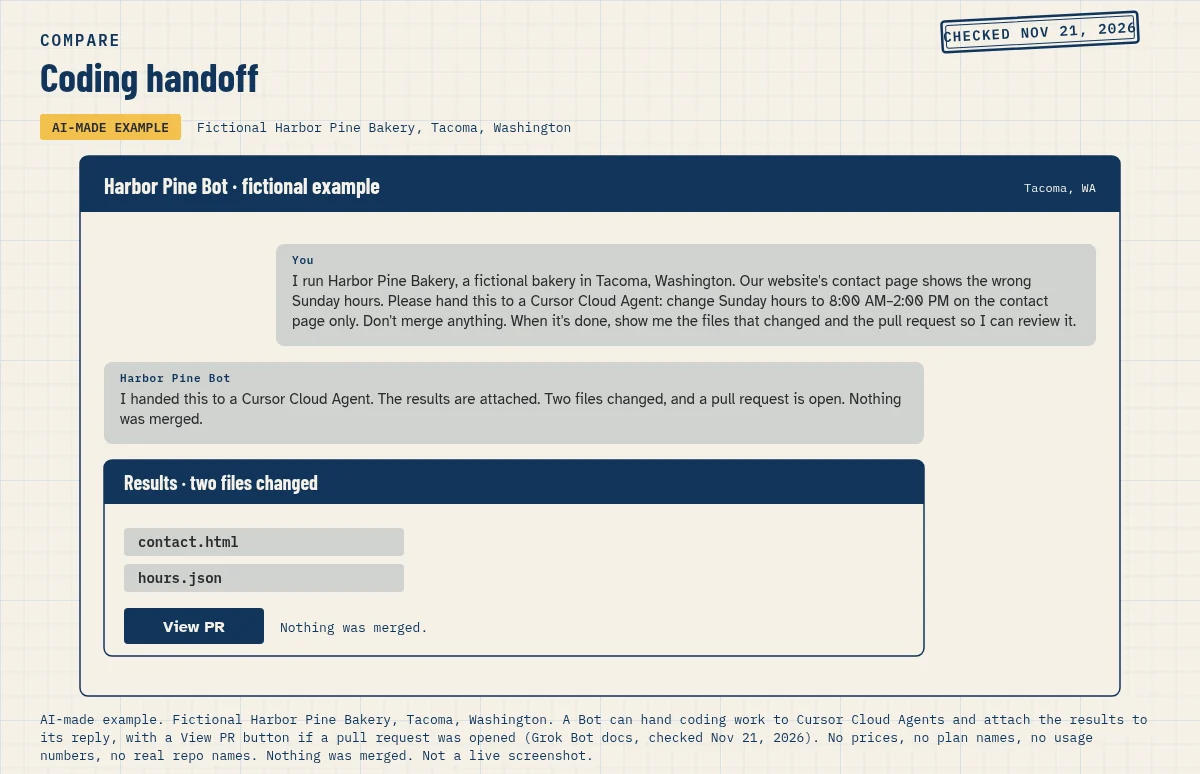
- Coding handoff. Bots “can also hand coding work to Cursor Cloud Agents and attach the results to their reply.” If the run opened a pull request, a View PR button opens it (Files and results). On teams, admins can turn this off.
New to Bots? Start with your first Bot, or read our Grok Bot review.
Pricing compared
The two companies count usage differently, so plans with the same price don’t give you the same amount of work. Claude’s Max says “5x Pro usage.” The X Subscription lists Premium at 4x, Super at 15x and Ultra at 50x the Plus “Base” amount. Those units don’t compare, and we don’t say one plan “gives more.”
Claude Code
Claude Code comes with a paid Claude plan or a Claude Console account. US prices from claude.com/pricing, checked Nov 21, 2026:
- Free ($0): Claude Code isn’t included.
- Pro: $20/month billed monthly, or $17/month billed yearly ($200 up front). Includes Claude Code.
- Max: $100/month, billed monthly only. “5x Pro usage every 5 hours and every week.”
- Ultra: $200/month, billed monthly only. “10x Pro usage every week,” with no 5-hour limit for verified accounts.
- Team (2–150 people): standard seat $20/seat/month billed yearly or $25 billed monthly; premium seat (5x standard usage) $100/seat/month yearly or $125 monthly. Includes Claude Code and Claude Cowork.
- Enterprise: “Seat price + usage at API rates”: $20/seat/month billed yearly, 20-seat minimum, and “Usage cost scales with model and task.” It adds SCIM, audit logs, role-based access, spend limits and a “HIPAA-ready offering available” (Anthropic’s wording).
- Pay-as-you-go: with a Claude Console account, “Claude Code consumes API tokens at standard API pricing.” Listed rates per million tokens (input/output): Opus 5.5 $4/$20, Sonnet 5.5 $2/$10, Fable 5.2 $8/$40, Haiku 5.5 $0.10/$0.50 (prompts up to 100K tokens).
Usage limits. “Pro and Max plans have a five-hour session limit and a weekly limit. Ultra plans have a weekly limit, and verified Ultra accounts don’t have a five-hour session limit.” Limits “are shared across Claude and Claude Code” (Claude Help Center). Anthropic doesn’t publish message or hour counts. It says, “How fast you reach a limit depends on the model you use, how long your chats are, and how large your files are.” When you hit a limit, you can upgrade, turn on usage credits, switch to a Console account and buy API credits, or wait.
Grok Bot
Grok Bot comes with The X Subscription. List prices before tax, checked Nov 21, 2026 on docs.x.ai and x.ai/pricing:
- Premium: $30/month or $300/year ($25/month).
- Super: $100/month or $1,000/year ($84/month).
- Ultra: $200/month or $2,000/year ($167/month).
- Free ($0) and Plus ($8): don’t include Grok Bot.
- Teams: $30 (Premium), $100 (Super) or $200 (Ultra) per seat, and you can mix tiers.
Usage comes from your seat’s weekly pool, shared across Grok, Grok Bot and Grok models in Cursor. When the pool runs out, you can buy additional-usage top-ups. To stop charges after that, leave Auto Top-up off or set a monthly additional-usage limit at grok.com/dashboard/billing. A cap doesn’t stop a run already in progress (FAQ).
Some accounts can start a trial: a usage credit with a 7-day window that never turns into a paid plan. A referred friend can get a different trial instead: a 2-week Premium trial that needs a card and becomes paid unless canceled. See referrals. Full details: Grok Bot pricing and plans compared.
Setting each one up
Claude Code
- Subscribe to Claude Pro or higher (or use a Claude Console account for pay-as-you-go).
- Install it. Open a terminal and run the install command from Anthropic’s overview page (macOS, Linux and WSL use a
curlcommand; Windows uses PowerShell; Homebrew and WinGet work too). Never used a terminal? Anthropic links a terminal guide from that page. Or skip the install and use the Claude desktop app: “The app includes Claude Code, so you don’t need to install the CLI separately. A paid subscription is required.” - Open your project folder (
cd your-project), then typeclaude. It asks you to log in the first time.
Requirements: macOS 13.0 or later, Windows 10 1809 or later (or Windows Server 2019 or later), or Ubuntu 20.04 or later; at least 4 GB of RAM; an internet connection; and a country Anthropic supports (setup).
I run Harbor Pine Bakery, a fictional bakery in Tacoma, Washington. Read this project and explain in plain English what each folder does and where the opening hours on the contact page come from. Don't change any files yet. Then suggest the smallest change to update the hours, and wait for my OK.
Grok Bot
- Get the app. Download the desktop app from the Grok Bot page at cursor.com/dashboard/bot (macOS, Windows and Linux), or use the iPhone or Android app. Grok Bot signs in with your Cursor account (Get started, FAQ).
- Create a Bot and tell it what job it does.
- Connect your apps, such as email and calendar, and set “Ask first” rules for anything you want to approve.
Step by step: your first Bot.
I run Harbor Pine Bakery, a fictional bakery in Tacoma, Washington. Our website's contact page shows the wrong Sunday hours. Please hand this to a Cursor Cloud Agent: change Sunday hours to 8:00 AM–2:00 PM on the contact page only. Don't merge anything. When it's done, show me the files that changed and the pull request so I can review it.
Safety and permissions
Both tools let you decide what needs your OK. They work differently, and we don’t rank them.
Claude Code has six permission modes, from default (asks before most edits, shell commands and network use) to bypassPermissions, which Anthropic says is for “Isolated containers and VMs only.” Deny rules block actions in every mode (permission modes). In current versions, auto mode is the starting mode in the terminal and VS Code: “A separate classifier model reviews actions instead of you and blocks the ones it judges unsafe.” Anthropic adds that auto mode “relies on classification systems and does not eliminate risk.” There’s a sandboxed Bash tool with file and network isolation, but “a Bash command you approve can still write anywhere your user account can.” And: “You’re responsible for reviewing proposed code and commands for safety before approval” (security).
Grok Bot can stop sensitive actions for your approval. You can add narrow “Ask first” rules for sending, publishing, deleting, purchasing and similar actions. An action that matches a rule “always gets a card,” with Allow or Not now (Approvals, security and privacy). Logins go through Vault, a password manager or a Secure Form, and API keys through a secure secret card. Never paste passwords or keys into the chat (How Grok Bot works).
With either tool, try it on test data first.
Using them together
If your business needs both kinds of work, here’s a simple split:
- Grok Bot for the business work: inbox, research, follow-ups, reports, calls to US businesses and meeting notes.
- Claude Code for the code: your website, app or scripts, run by you or your developer.
- Or let a Bot hand off small code jobs. A Bot can pass coding work to a Cursor Cloud Agent and show you the pull request.
- Connect the two worlds with a routine. A Grok Bot routine can start on a GitHub event, for example to summarize a new issue for you in plain English.
For keeping accounts and logins separate when you use Grok Bot alongside other AI tools, see Grok Bot with Claude and Cursor. Weighing other agents too? See personal AI agents compared, the best AI assistant guide, or all Grok Bot comparison guides.
FAQ
Is Claude Code free?
No. Claude Code isn’t on the Free plan. It starts with Claude Pro at $20 a month ($17 a month billed yearly), or you can pay as you go at API rates with a Claude Console account (checked Nov 21, 2026).
Is Claude Code good for non-coders or non-technical people?
Anthropic builds Claude Code for software engineering, and it offers Claude Cowork for non-coding work like research, analysis and documents. If you don’t write code, look at Cowork or a business agent like Grok Bot first.
What’s the difference between Claude Code and Claude Cowork?
In Anthropic’s words, Claude Code “is built for software engineering — writing, debugging, and shipping code,” while Cowork “is built for non-coding knowledge work — research, analysis, document creation, and other multi-step tasks.” See Grok Bot vs Claude Cowork.
Can Grok Bot write code?
A Bot can hand coding work to a Cursor Cloud Agent and attach the results to its reply, with a View PR button if a pull request was opened. Its cloud computer also has a terminal.
Is Claude Code worth it for a small business?
It depends on the job. If you or someone on your team maintains a website, app or scripts, it’s built for that work. If your work is email, scheduling, research and follow-ups, it isn’t the tool Anthropic points you to.
Do they share usage limits with the chat apps?
Yes, both do. Claude’s limits “are shared across Claude and Claude Code.” Grok Bot uses your seat’s weekly pool, shared with Grok and Grok models in Cursor.
Can I pick the AI model?
In Claude Code, yes, you can choose the model. In Grok Bot, no. “Grok Bot picks the model for each task, and there is no model picker.”
Is Grok Bot the same as Grok Build?
We haven’t reviewed Grok Build.