Muse is Meta’s personal AI agent that can take actions for you and connect to other apps. Grok Bot is a separate app that runs AI “Bots” on a cloud computer, signs in with a Cursor account, and works through your connected tools, websites and files. Here’s how they compare on price, phone calls, approvals and fit for a small US business, using only what each maker publishes.
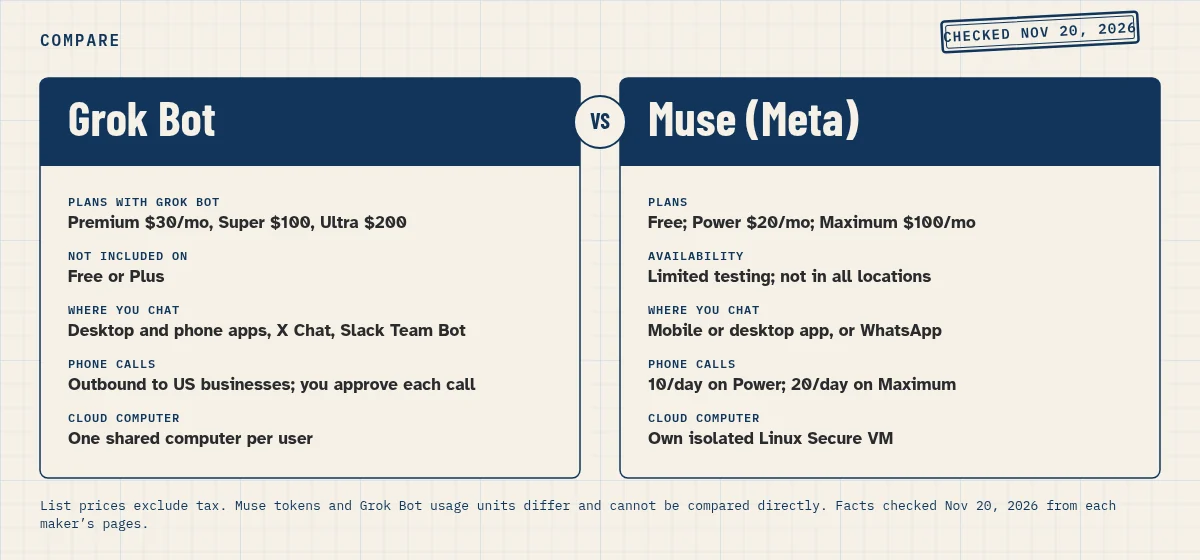
Quick pick
- Pick Muse if you want to chat with your agent inside WhatsApp, or your business runs on Facebook, Instagram and Meta ads. Meta’s small-business page says Muse connects those “in one step.”
- Pick Grok Bot if you want several Bots working as a team, a Team Bot in Slack, or work that starts on its own from a schedule, a Slack message, a webhook or a GitHub event. It also fits shops that already use Cursor.
- Try both if you’re not sure yet. Muse has a free tier with a usage limit. Grok Bot needs a Premium plan or higher, and some accounts can start a trial.
Grok Bot and Muse in one minute
What Muse is
- Meta describes Muse as “your personal AI agent that can take actions and help get things done with your direction, and can be connected with other apps and services.” (Meta help)
- Each Muse has its own persistent, isolated Linux computer in the cloud, the “Muse Secure VM,” with a full browser you can step into. (muse.ai)
- You chat with it in the Muse app on mobile or desktop, or directly in WhatsApp, by message or with voice mode. (muse.ai)
What Grok Bot is
- Bots use a persistent cloud computer, connected tools, websites and files to get work done. They keep working in the background and can coordinate with other Bots. (Grok Bot FAQ)
- Grok (the chat app) and Grok Bot are two different apps. Grok Bot signs in with your Cursor account. (Grok Bot FAQ)
- You get one cloud computer, and all your Bots share it: files, browser sessions and logins. (Computer and apps)
New to Grok Bot? Start with what Grok Bot is and how it differs from Grok.
Prices side by side (checked Nov 20, 2026)
| Plan | Monthly price | What the maker lists | Phone calls | |
|---|---|---|---|---|
| Muse | Free | $0 | Free with a usage limit that refreshes | Not stated |
| Muse | Power | $20 | 500M Muse tokens a week | 10 a day |
| Muse | Maximum | $100 | 3B Muse tokens a week | 20 a day |
| Grok Bot | Free or Plus | $0 or $8 | Grok Bot not included | — |
| Grok Bot | Premium | $30 ($300/yr) | Grok Bot included, 4x Plus usage | Outbound, US only |
| Grok Bot | Super | $100 ($1,000/yr) | Grok Bot, 15x Plus usage, meetings | Outbound, US only |
| Grok Bot | Ultra | $200 ($2,000/yr) | Grok Bot, 50x Plus usage, meetings | Outbound, US only |
- Muse: prices and limits from Meta’s “About Muse subscriptions” page. Plans renew monthly. Meta says benefits “may vary by region and account,” and you must be 18 or the age of majority to subscribe.
- Grok Bot: list prices for The X Subscription from docs.x.ai and x.ai/pricing. They don’t include sales tax. Meetings come from the meetings page.
- The usage units are different. Muse counts “Muse tokens.” Grok Bot plans count usage as a multiple of the Plus plan. You can’t line them up one to one, so we don’t say either plan “gives more.”
Full plan details: Grok Bot pricing.
Feature by feature
| Feature | Grok Bot | Muse (Meta) |
|---|---|---|
| Where you chat | Desktop and phone apps, X Chat, tagging @bot on X, and a Team Bot in Slack | Muse app on mobile or desktop, or WhatsApp, by message or voice |
| Own cloud computer | Yes, one per user, shared by all your Bots | Yes, a persistent, isolated “Muse Secure VM” with a browser |
| Approvals before sending or buying | Sensitive actions can stop for your approval; you can add “Ask first” rules | You approve actions such as sending email and making purchases; full audit trail |
| Password handling | Logins go through Vault, a password manager or a Secure Form; API keys through a secret card | Secure Credentials Store, so the model doesn’t see your password |
| Phone calls | Outbound calls to US businesses, approved one by one | 10 or 20 calls a day on paid plans |
| Meetings | Joins Google Meet, Zoom or Microsoft Teams on Super, Ultra, Team and Enterprise | Not stated on the maker’s pages we checked |
| Small-business connectors | Account-wide apps (for example Gmail, Google Calendar, Slack), plus websites without a connector | “Muse for Small Business” names Asana, Box, Canva, Dropbox, Figma, Granola, HighLevel, Intuit QuickBooks, Klaviyo, Lovable, Notion, Shopify, Slack, Stripe and Zoom |
| Teams | Team seats at $30, $100 or $200 per seat; Team Bots in Slack | Team plans not stated on the maker’s pages we checked |
| Scheduled and event work | Routines on a schedule, a Slack message, a GitHub, Linear, Sentry or PagerDuty event, or a webhook | Not stated as schedules; Meta says Muse “proactively helps” and suggests ideas |
| Builds missing tools | Can add an MCP server that isn’t in the catalog | “If a task needs a tool that doesn’t exist, your agent builds it for you” |
Phone calls: what each maker’s pages say
- Grok Bot can call a business for you, for example to book a table or ask about an order, and tell you how it went. Calls are US only, from the desktop and phone apps. The first time, you agree to calling terms, including that you’ll only call US businesses and people who’ve consented to hear from you. Before each call you see who it will call and choose Call or Cancel. You get a live transcript, can take over the call, and get the transcript and recording afterward. (Chat and collaboration)
- Muse: Meta’s help page lists 10 phone calls a day on Power and 20 a day on Maximum. It doesn’t say more about who Muse can call.
- Neither maker’s pages describe answering your business phone line. If you need a receptionist that picks up incoming calls, see can Grok Bot make or answer phone calls?
Approvals and safety
- Grok Bot: sensitive actions can stop for your approval, and you can add narrow “Ask first” rules for sending, publishing, deleting, purchasing and similar actions. Approvals from work that started without you, like a routine, expire after about 30 minutes. Never paste passwords or API keys into chat; use Vault or a secret card. (Approvals, security and privacy) More in how approvals work and Vault.
- Muse: every outside action runs through “Sentinel,” a separate agent that grants permission. Purchases go through Link by Stripe with a one-time card number for each purchase. (Muse security and privacy)
Pros and cons
Grok Bot pros
- Bots keep working on the cloud computer when your laptop is closed.
- Several Bots can work together, and a Team Bot can live in your Slack.
- Routines can start from schedules and events, not only from a chat.
- Outbound phone calls in the US, with your OK on each call.
- Meetings on Super and higher: notes, chat answers and a summary afterward.
Grok Bot cons
- No model picker. Grok Bot picks the model for each task. (Grok Bot FAQ)
- Your Bots share one computer. The docs say: “Do not use separate Bots as a security boundary.” (Computer and apps)
- The cheapest plan with Grok Bot is $30 a month (Premium). Free and Plus don’t include it.
- Meetings need Super or higher, so they’re not on Premium. (Meetings)
Muse pros
- Free tier with a usage limit that refreshes.
- Chat inside WhatsApp as well as the Muse app.
- A named list of small-business connectors, including QuickBooks, Shopify, Stripe and Meta ads.
- A separate permission agent (Sentinel) and one-time card numbers for purchases.
Muse cons
- Limited testing. Meta says Muse and Muse subscriptions “are in limited testing and aren’t available in all locations yet.”
- Benefits can vary by region and account.
- Meta’s help page describes monthly renewal only.
- Meta’s pages we checked don’t describe team plans or meetings.
Same task in each: a Monday catch-up brief
Here’s one prompt you can paste into either agent to see how each handles a real weekly job. We haven’t published a run of this prompt in either product, so there’s no result to show here. Try it yourself and compare.
The example business is fictional: North Shore Paper Co., a stationery shop in Duluth, Minnesota, (218) 555-0102.
You help me run North Shore Paper Co., a small stationery shop in Duluth, Minnesota (fictional example). Every Monday at 8:00 AM Central Time, give me a catch-up brief:
1. Customer emails from the past 7 days that still need a reply, with a one-line summary of each.
2. Calendar events for this week, Monday through Saturday.
3. Three things I should decide this week, each with one sentence on why.
Keep it under 200 words. Draft replies only. Don't send, buy, delete or change anything without asking me first.
Which should a small business pick?
- Your customers message you on WhatsApp → Muse lists WhatsApp chat. With Grok Bot, see how to connect Grok Bot to WhatsApp, which uses a third-party service.
- You run ads on Facebook and Instagram → Muse names Meta ads and Instagram on its small-business page.
- You work in Slack with a team → Grok Bot has Team Bots in Slack and team seats.
- You want jobs to start on their own (a schedule, a Slack message or a webhook) → Grok Bot routines.
- You want a free start → Muse has a free tier. Grok Bot starts at $30 a month on Premium, with a trial on some accounts.
- You need it to join your meetings → Grok Bot on Super or higher. Meta’s pages don’t list meetings for Muse.
- You’re outside the US → check Muse’s availability in your location, and note Grok Bot calls are US only.
Not sure what a Bot could do for you? Browse 46 Grok Bot ideas. Comparing more agents? See Grok Bot vs Muse vs dots vs Claude Duet, Grok Bot vs ChatGPT, Grok Bot vs Claude and all comparisons. Wondering if Grok Bot is worth paying for? Read our Grok Bot review.
FAQ
Is Muse free?
Yes, with a usage limit. Meta says Muse is free with a limit that refreshes, and you can upgrade to Power ($20 a month) or Maximum ($100 a month) for more. (Checked Nov 20, 2026.)
How much is Muse compared with Grok Bot?
Muse: free, $20 or $100 a month. Grok Bot: included on Premium ($30 a month), Super ($100) and Ultra ($200), before tax. The usage units differ, so compare what you’d actually use. See Grok Bot pricing.
Can Muse or Grok Bot make phone calls?
Grok Bot can make outbound calls to US businesses, and you approve each call. Meta’s help page lists 10 calls a day on Power and 20 a day on Maximum. Neither maker documents answering your business line.
Can I use Muse in WhatsApp? Is Grok Bot in WhatsApp?
Muse: yes, Meta says you can chat with it directly in WhatsApp. Grok Bot’s docs don’t list WhatsApp as a built-in app; our WhatsApp guide connects them through a third-party service.
Is Grok Bot made by Meta?
No. Grok Bot is a separate app that signs in with your Cursor account. Bot Agents 24 is independent and isn’t affiliated with either maker.
Which is better for a small business?
It depends on where you work. Use the decision list above. We don’t give either one a score.