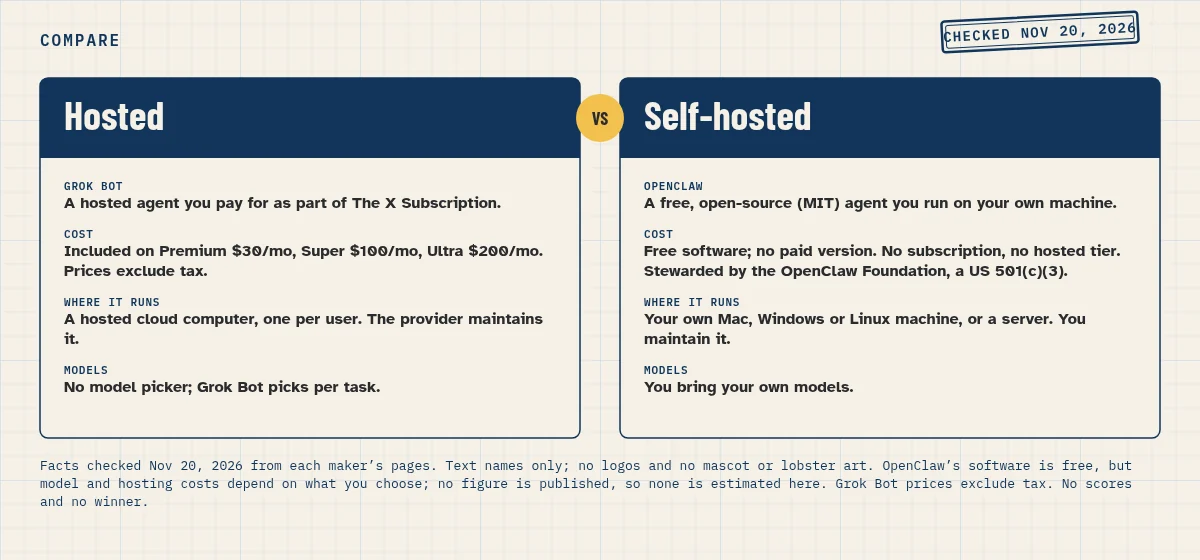
Grok Bot is a hosted agent you pay for as part of The X Subscription. OpenClaw is a free, open-source agent you run on your own machine. Here’s how they differ on cost, control and safety, and which fits a small business.
Bot Agents 24 is an independent guide and isn’t affiliated with xAI or OpenClaw. We compared public documentation; we didn’t run OpenClaw.
Quick pick
- Pick Grok Bot if you want an agent that runs in the cloud without you maintaining anything, with approvals, connected apps and US phone calls built in, and you’re fine paying from $30 a month.
- Pick OpenClaw if you’re comfortable running software yourself, want to choose your own models, and want your agent in chat apps such as WhatsApp or Telegram.
- Not sure? If “run a gateway on a server” sounds unfamiliar, start with a hosted option.
What OpenClaw is
OpenClaw is an open-source (MIT-licensed), self-hosted AI assistant. It runs on your Mac, Windows or Linux machine, or on a server, and you chat with it in WhatsApp, Telegram, Discord, Slack, Signal, iMessage, Teams and other channels. You bring your own models. (openclaw.ai, OpenClaw docs)
On price, its site says: “No subscription. No hosted tier. No token.” and “There is no enterprise edition and no paid version.” It’s stewarded by the OpenClaw Foundation, a US 501(c)(3) nonprofit. Its docs describe it as for “developers, power users, and teams.”
What Grok Bot is
Grok Bot’s Bots use a persistent cloud computer, connected tools, websites and files to get work done. They keep working in the background, even with your laptop closed. One cloud computer per user is shared by all your Bots. (Grok Bot FAQ)
Grok Bot is included on Premium ($30/mo), Super ($100/mo) and Ultra ($200/mo) on The X Subscription; Free and Plus don’t include it (checked Nov 20, 2026). There’s no model picker: Grok Bot picks the model for each task. See Grok Bot pricing.
Side by side
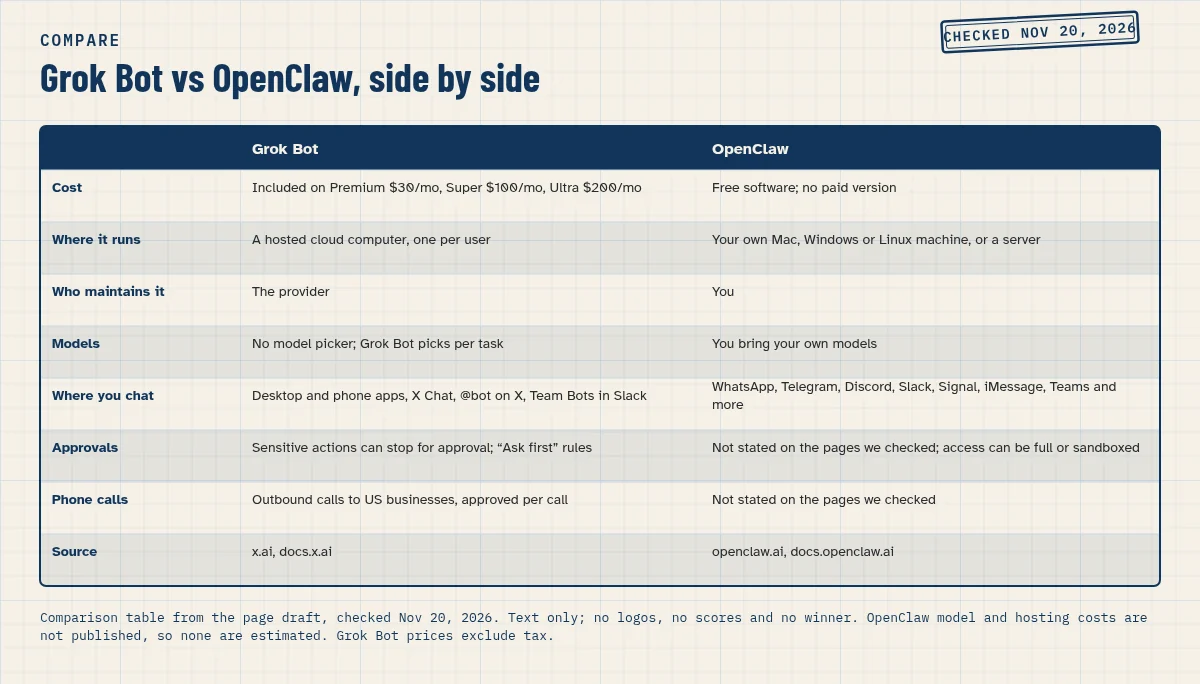
| Grok Bot | OpenClaw | |
|---|---|---|
| Cost | Included on Premium $30/mo, Super $100/mo, Ultra $200/mo | Free software; no paid version |
| Where it runs | A hosted cloud computer, one per user | Your own Mac, Windows or Linux machine, or a server |
| Who maintains it | The provider | You |
| Models | No model picker; Grok Bot picks per task | You bring your own models |
| Where you chat | Desktop and phone apps, X Chat, @bot on X, Team Bots in Slack | WhatsApp, Telegram, Discord, Slack, Signal, iMessage, Teams and more |
| Approvals | Sensitive actions can stop for approval; “Ask first” rules | Not stated on the pages we checked; access can be full or sandboxed |
| Phone calls | Outbound calls to US businesses, approved per call | Not stated on the pages we checked |
| Source | x.ai, docs.x.ai | openclaw.ai, docs.openclaw.ai |
What “free” means with OpenClaw
The software is free. But you bring the models and the machine, and those can cost money depending on what you choose. OpenClaw doesn’t publish a cost figure, so we don’t estimate one. Before you start, check the pricing of whichever model provider and server you plan to use.
With Grok Bot, the plan price includes a weekly usage pool shared across Grok, Grok Bot and Grok models in Cursor. Top-ups buy additional usage. See usage limits.
Safety: full system access on your own machine
OpenClaw describes “Full System Access”: it browses the web, fills forms, reads and writes files and runs shell commands, with “full access or sandboxed — your choice.” That’s powerful, and it means the safety setup is yours to get right on your own computer.
Grok Bot runs on a separate cloud computer rather than your laptop. Sensitive actions can stop for your approval, and logins go through Vault or a secure form, never pasted into chat. One caution from its docs: all your Bots share one cloud computer, so “do not use separate Bots as a security boundary.” See Grok Bot security.
Neither model is automatically “safer.” It depends on how carefully you set it up.
Pros and cons
Grok Bot pros
- Nothing to host or update yourself.
- Approvals and secure logins built in.
- Outbound US phone calls with per-call approval.
Grok Bot cons
- Costs at least $30 a month.
- No model choice.
- Fewer chat channels than OpenClaw.
OpenClaw pros
- Free, open-source software (MIT).
- Bring your own models.
- Lives in the chat apps you already use, including WhatsApp.
OpenClaw cons
- You run and maintain it.
- Model and hosting costs are yours to work out.
- Full system access needs careful setup.
Which fits a small business?
If you don’t have someone technical on the team, a hosted agent like Grok Bot is the simpler start: you set up a Bot, connect apps and approve actions. If you do have a developer, or you want your agent inside WhatsApp with models you choose, OpenClaw is worth a look. Try either one on test data first.
FAQ
Is OpenClaw free?
Yes. Its site says there’s no subscription and no paid version. Model and hosting costs depend on what you choose, and OpenClaw doesn’t publish a figure.
Do I need to be technical to use OpenClaw?
Its docs say it’s for “developers, power users, and teams.” Expect to run and maintain it yourself.
Can OpenClaw use WhatsApp?
Yes. WhatsApp is one of the chat channels it lists. For Grok Bot and WhatsApp, see WhatsApp.
Which is safer?
They give you different kinds of control. OpenClaw runs on your own machine with full or sandboxed access. Grok Bot runs on a hosted cloud computer with approvals. The safer one is the one you set up carefully.