Grok Bot comes with some plans of The X Subscription. This page shows which ones, what each costs and how usage is counted, with the date we last checked. Bot Agents 24 is independent, so always confirm on x.ai/pricing before you buy. Prices change.
Free prompts: every prompt on this site is free to copy and paste into Grok Bot. Browse the free Grok Bot prompts library.
How much does Grok Bot cost?
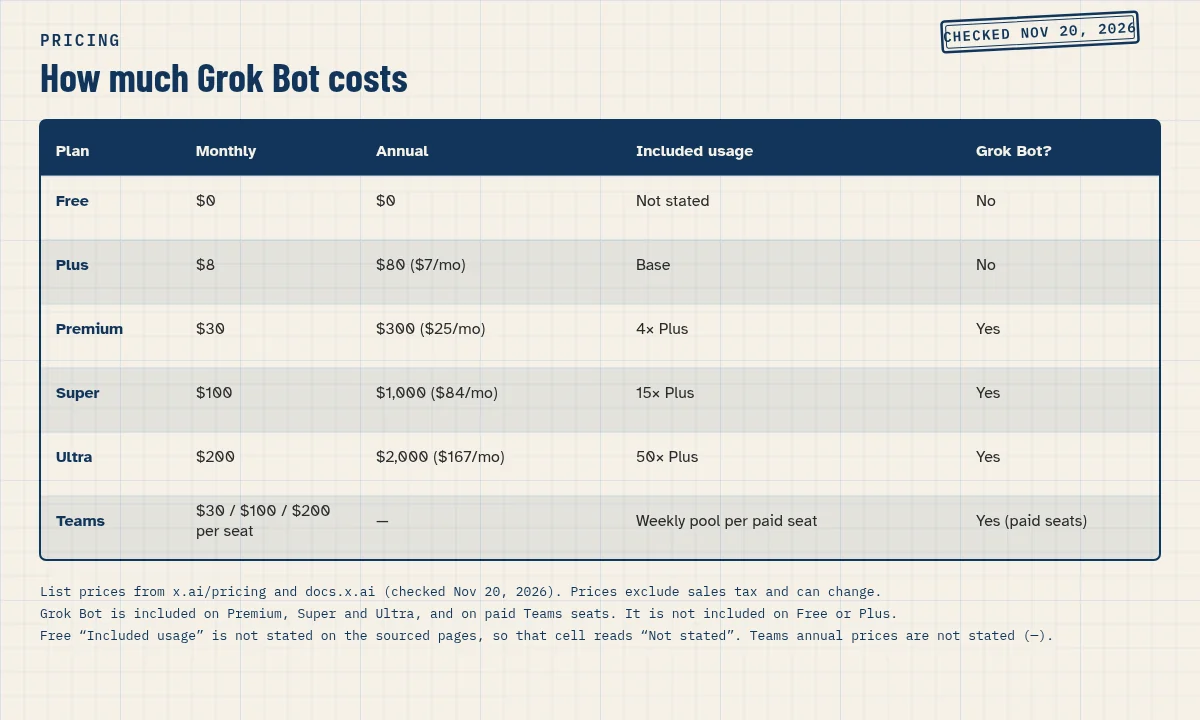
Last checked: Nov 20, 2026.
| Plan | Monthly | Annual | Included usage | Grok Bot? |
|---|---|---|---|---|
| Free | $0 | $0 | Limited | No |
| Plus | $8 | $80 ($7/mo) | Base | No |
| Premium | $30 | $300 ($25/mo) | 4x Plus | Yes |
| Super | $100 | $1,000 ($84/mo) | 15x Plus | Yes |
| Ultra | $200 | $2,000 ($167/mo) | 50x Plus | Yes |
| Teams | $30 / $100 / $200 per seat | — | Same as the matching tier, per seat | Yes (paid seats) |
List prices from x.ai/pricing and docs.x.ai, checked Nov 20, 2026. Prices exclude sales tax and can change. “—” means no annual team price is listed.
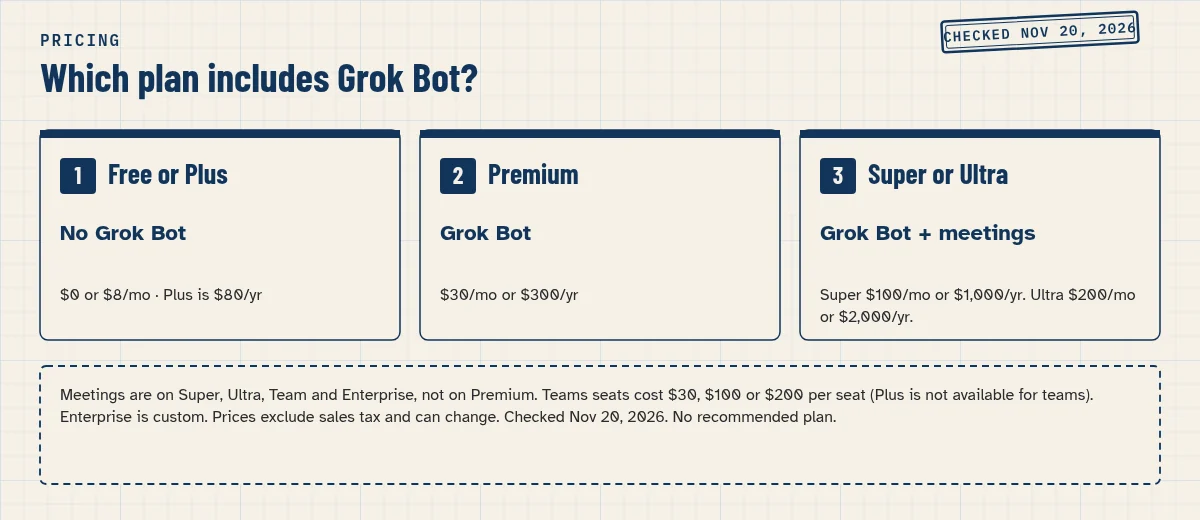
- Cheapest plan with Grok Bot: Premium, $30 a month or $300 a year.
- Enterprise is priced by quote. x.ai/pricing lists it as “Custom,” with “Contact Sales” for custom rate limits, SSO, compliance requirements and data residency.
- Bought only from the maker. x.ai/pricing says subscriptions are sold only directly through X Subscription Corp, with no authorized resellers.
Is Grok Bot free?
Not on the Free or Plus plans. Grok Bot is included on Premium, Super and Ultra. (Grok Bot on The X Subscription)
- Some accounts can choose Start Trial. The trial is a usage credit with a 7-day window. It never turns into a paid plan, and credit you’ve used isn’t restored.
- The referral trial is different again: a 2-week Premium trial for a referred friend, with a card, that becomes paid unless canceled. See referrals below.
- An App Store trial is different. A trial started in the iOS app is run by Apple and becomes a paid Apple subscription unless you cancel it.
(Grok Bot FAQ) Step by step: how to get Grok Bot free with the trial.
What does extra usage cost?
- One weekly pool per paid seat. It’s shared across Grok, Grok Bot and Grok models in Cursor, and it refreshes every week. Different activities draw different amounts. (Usage limits)
- When the pool runs out, top-ups buy Additional Usage credits. Third-party models in Cursor aren’t in the pool; they use these credits from the first use.
- We don’t list a price per top-up or per task. We couldn’t confirm one on the maker’s pages, so check your billing screen.
- To stop extra charges, leave Auto Top-up off or set a monthly additional-usage limit at grok.com/dashboard/billing. A cap doesn’t stop a run that’s already in progress. (Grok Bot FAQ)
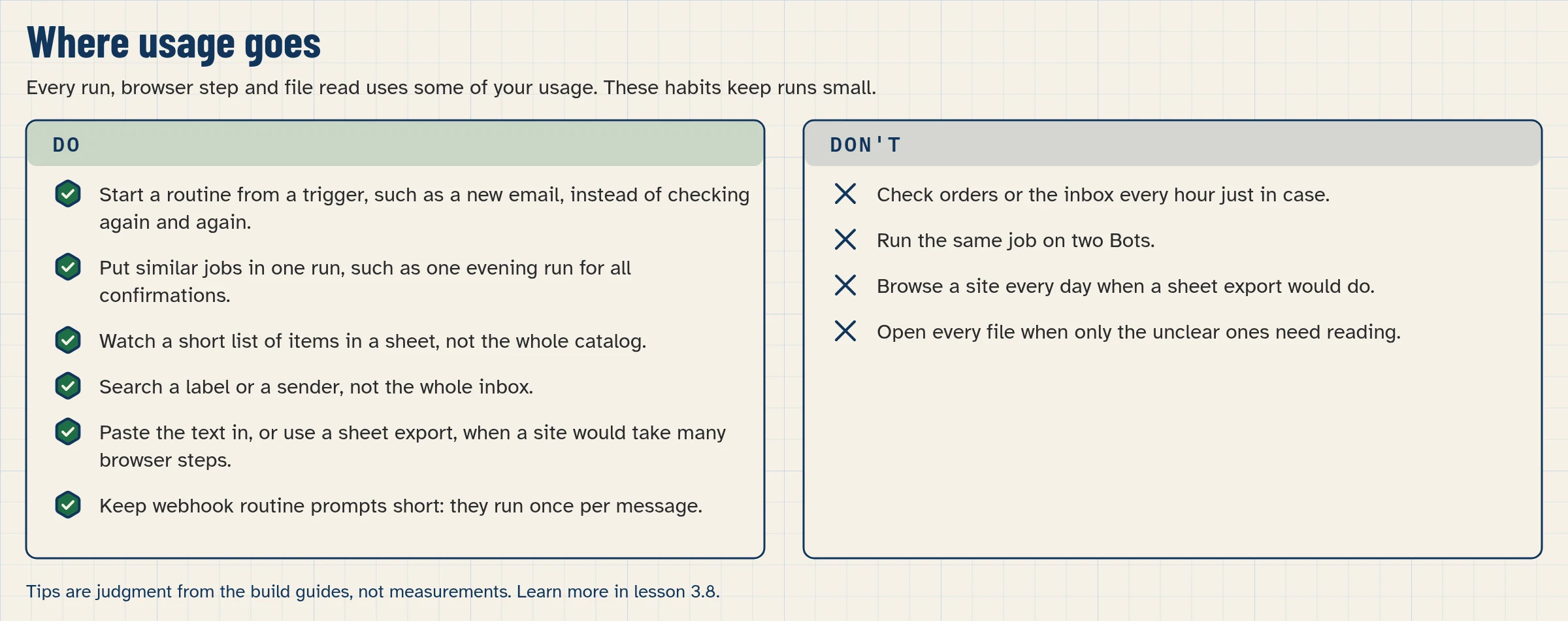
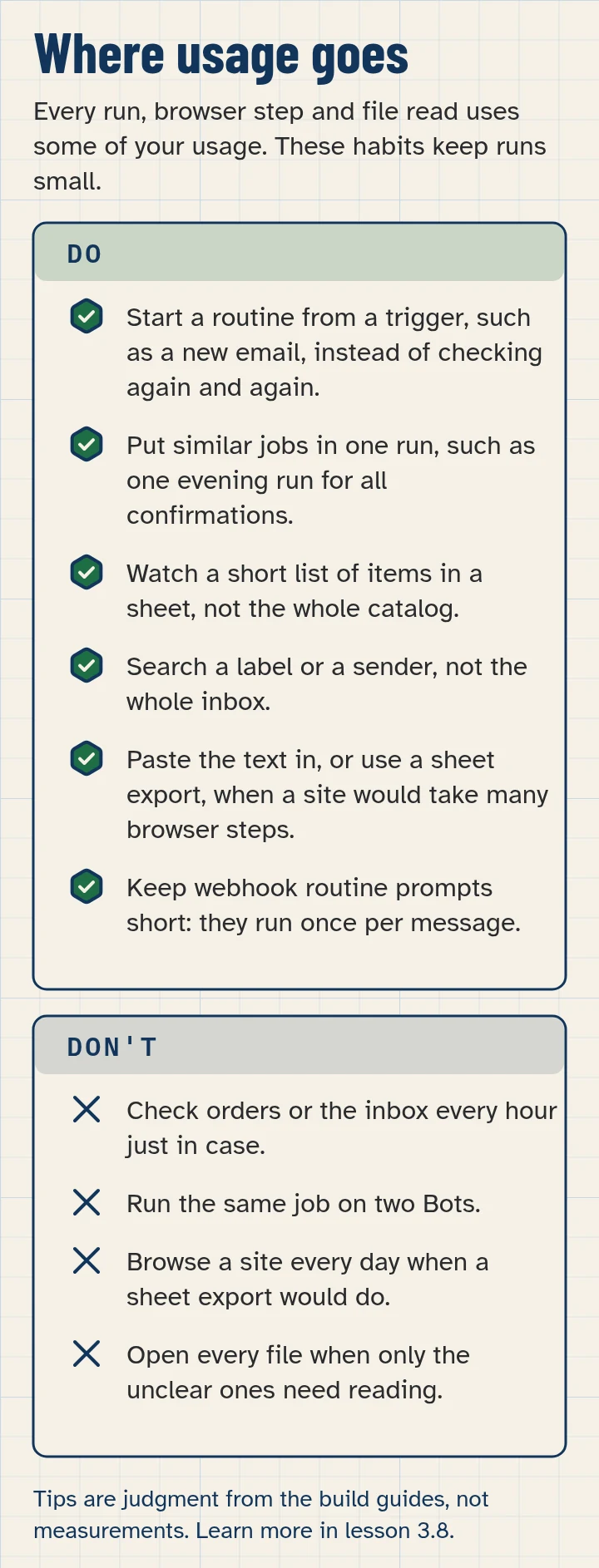
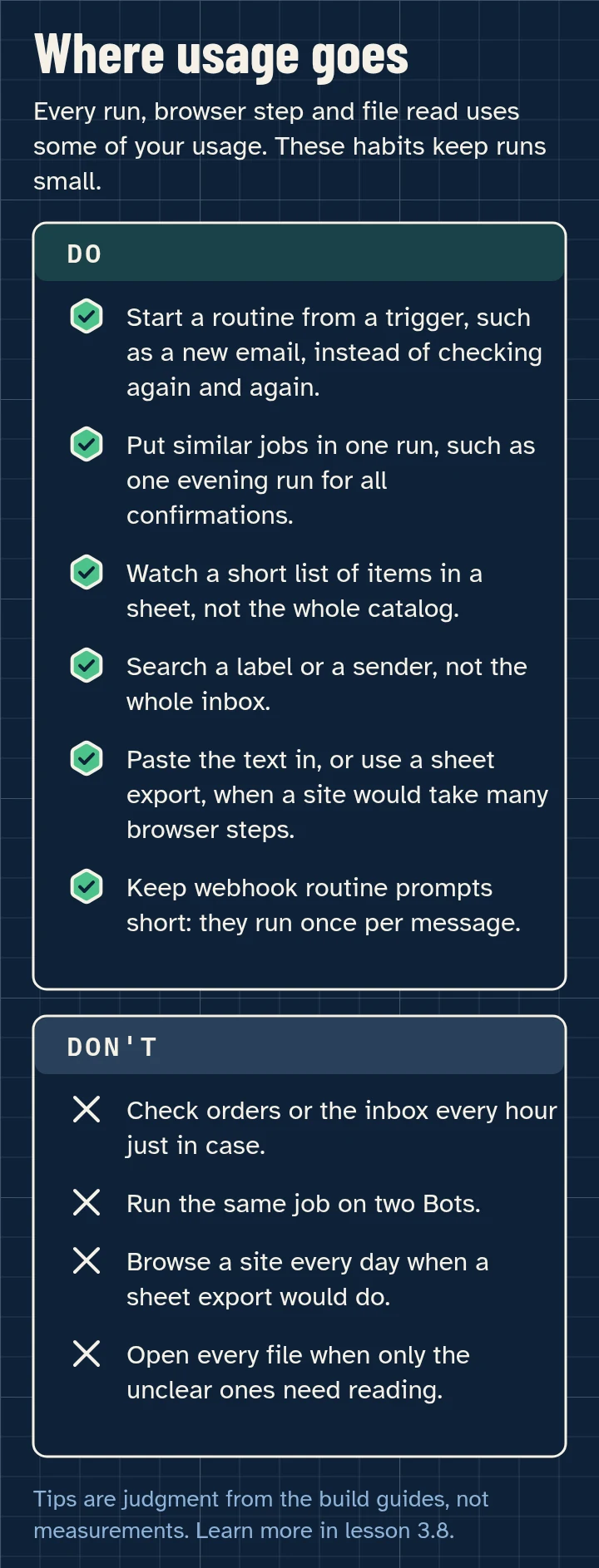
More: how to check your usage limits and top up and where usage goes.
Already on Cursor, SuperGrok or X Premium?
Grok the chat app and Grok Bot are different apps. See Grok Bot vs Grok.
- Your existing plan continues. Switching to The X Subscription is optional. A completed unification is permanent. (Grok Bot on The X Subscription)
- Older Cursor plans: legacy Cursor Pro, Pro+, Ultra and self-serve Teams include Grok Bot.
- Linked plans: an individual SuperGrok, SuperGrok Plus, SuperGrok Heavy or X Premium+ subscription can be linked. SuperGrok Lite and Grok Enterprise can’t. A Cursor plan and a SuperGrok link don’t add together.
- Older Cursor plan prices (they keep working as they are): Pro $20/mo, Pro+ $60/mo, Ultra $200/mo, Teams Standard $40 and Teams Premium $120 per user a month. Cursor compares them with Premium ($30), Super ($100), Ultra ($200), and Premium or Super team seats. Older plans have two monthly pools plus on-demand usage billed afterward; The X Subscription has one weekly pool plus prepaid top-ups. Cursor says each paid X Subscription plan includes at least twice as much coding usage with Cursor models as the older plan it replaces, and drops the included third-party model allowance. That’s about coding in Cursor, not Grok Bot usage. (Legacy Cursor plans)
- Refunds when you switch: eligible direct-billed older plans are canceled with a prorated refund to the original payment method. App Store Grok, Grok Bot or X Premium subscriptions are canceled automatically and the refund is requested from Apple, which decides. You cancel App Store Cursor subscriptions yourself; on Google Play, check and cancel yourself. (Invoices and refunds)
(Grok Bot FAQ) More: Grok Bot on SuperGrok or another older plan and Grok Bot on a Cursor plan.
Buying on your phone, canceling and referrals
- On your phone: the Grok Bot mobile docs say only monthly individual plans are available through the mobile app, billed by the App Store (iOS) or Google Play (Android). For yearly billing, Teams or Enterprise, subscribe on the web. The store handles that subscription, so cancel or ask for a refund through Apple or Google. Android has no in-app trial. (Grok Bot mobile)
- Canceling: if you pay directly, cancel at grok.com/dashboard under Billing & invoices; you can cancel at any time, and team seats stay active to the end of the billing period. If you subscribed on X, cancel in X; through Google Play, cancel in Google Play. x.ai/pricing says to cancel at least 24 hours before renewal to avoid additional charges. Canceling doesn’t undo a completed account unification. (Cancel, x.ai/pricing) Step by step: how to cancel Grok Bot.
- Referrals: a paid Premium, Super or Ultra subscriber on The X Subscription, based in the US, can refer friends (Plus, Team and older Cursor or SuperGrok plans can’t). The friend, who must be new to Grok and in one of 16 listed countries, gets a 2-week Premium trial (card required, with a reminder 7 days before the first charge). It becomes paid unless canceled. You get one free usage reset for each friend who becomes a paid subscriber, added 7 days after their payment and valid for 6 months. A code works up to 10 times; app-store purchases don’t count; the program can change or end. This is separate from the 7-day usage-credit trial above. (Referral program) Details: referrals.
What you get on each plan for Grok Bot
- Premium: Grok Bot, with 4x Plus usage.
- Super and Ultra: Grok Bot with more usage (15x and 50x Plus), plus meetings: a Bot can join Google Meet, Zoom or Microsoft Teams calls, take notes and send a summary. Meetings are on Team, Enterprise, Ultra and Super plans, so not on Premium. (Meetings)
- Team seats: $30 (Premium), $100 (Super) or $200 (Ultra) per seat. You can mix tiers, for example three Premium seats and one Super seat. Plus isn’t available for teams. Each seat has its own weekly pool; the team shares a prepaid balance for Additional Usage. (Pricing, Usage limits)
- Refunds: Grok Bot has no separate subscription or refund path. Prepaid credit you’ve already spent isn’t refundable. (Grok Bot FAQ)
Choosing between them? See Premium vs Super vs Ultra or try the plan picker.
Every page in this section
- How to get Grok Bot free: the free trial
- How to cancel Grok Bot (trial, X Subscription, App Store)
- How to choose a plan: Premium vs Super vs Ultra
- Monthly vs annual billing
- How to set up a Teams plan
- How to check your usage limits and top up
- Why is Grok Bot so expensive? Where usage goes
- How to earn a usage reset with referrals
- How to use Grok Bot on a Cursor plan
- How to track Cursor usage with Grok Bot
- How to get Grok Bot on SuperGrok or another legacy plan
- How to combine your Grok, Cursor and X accounts safely before switching plans
Where to go next
- Is Grok Bot worth it? Our review
- Personal AI agents compared: Grok Bot, Muse, dots and Claude Duet
- Grok Bot compared
- Comparing Grok Bot with ChatGPT, Claude, Gemini or Microsoft Copilot? See the best AI assistant for small business.
- FAQ hub
- How to use Grok Bot: the free zero-to-advanced path
FAQ
How much does Grok Bot cost?
$30 a month on Premium ($300 a year), $100 on Super ($1,000 a year) or $200 on Ultra ($2,000 a year), before tax. Checked Nov 20, 2026.
Is Grok Bot free?
Not on the Free or Plus plans. Some accounts can start a trial: a usage credit with a 7-day window that never turns into a paid plan. An App Store trial started in the iOS app is different and becomes a paid Apple subscription unless you cancel.
What’s the cheapest plan with Grok Bot?
Premium, at $30 a month or $300 a year (checked Nov 20, 2026).
Do prices include tax?
No. The list prices don’t include sales tax. Where required, tax may be added at checkout.
Do Grok Bot and Cursor share one usage pool?
Yes, on The X Subscription. One weekly pool per seat covers Grok, Grok Bot and Grok models in Cursor. Third-party models in Cursor are paid separately with Additional Usage credits.
What happens when I run out?
Your included usage is used up until the weekly reset. To keep going, top-ups buy Additional Usage credits, or you can move to a bigger plan. To stop extra charges, leave Auto Top-up off or set a monthly additional-usage limit at grok.com/dashboard/billing. A cap doesn’t stop a run already in progress.
Can I pay yearly?
Yes. Yearly prices are $300 (Premium), $1,000 (Super) and $2,000 (Ultra), which works out to about $25, $84 and $167 a month. Prices exclude tax. Yearly billing isn’t sold in the phone apps; subscribe on the web. See monthly vs annual billing.
Can I cancel anytime?
Yes. If you pay directly, cancel at grok.com/dashboard under Billing & invoices. x.ai/pricing says to cancel at least 24 hours before renewal to avoid additional charges. If you subscribed on X, Google Play or the App Store, cancel there.
Is Grok Bot sold by resellers?
No. x.ai/pricing says subscriptions are sold only directly through X Subscription Corp, with no authorized resellers.